
Keep the method attached.
The sample journal identifies Adaptive Swing, Channel Guard and other strategies alongside each position and its state.
A complete workflow for crypto positions. Analyse the market, approve a strategy-based plan and let your terminal follow its rules. Keep the evidence to improve your next decision.
Trading runs in the installed terminal. The screens shown here use simulated Demo data.

Keep the market thesis, strategy, approved actions and actual outcome together through the whole life of a position.
Study levels, channels, liquidity and structure across timeframes. Preserve the context behind your decision.
Apply your strategy to this position. Set the budget, entry conditions, protection and exit rules before launch.
Your terminal monitors conditions and performs the permitted actions, including protection, trailing and partial exits.
Compare intent with execution, costs and outcome. Keep what worked and deliberately revise the rules that need attention.
Review returns to planning. The goal is a repeatable trading skill.
Use multi-timeframe structure, levels, channels and liquidity context to shape the trade. A decision-time snapshot keeps that market context available for later review.
A strategy provides the reusable playbook. Your position plan sets the conditions and actions for this account, asset and budget. You approve its branches before the terminal runs them.
Explore Market IntelligenceSet the market, position budget and conditions before launch.
The terminal follows the branches you approve. Changes outside that plan require your review.
Alongside buying first and selling later, PositionPilot supports sell-first plans for assets you already own: sell an allocated amount, then use the proceeds to buy back.
If the price falls, those proceeds can buy more units. Entry conditions, buyback rules and the outcome stay in the same managed position.
There is no borrowed position to liquidate. A price rise can leave you with fewer units after buyback; trading losses remain possible. Availability depends on the supported workflow.
Explore sell-first position control0.25 more units after the cycle, before fees.
The same $100 funds the buyback. More asset units do not guarantee a higher cash value. Fees and execution prices change the result.
Bring trades from your connected accounts into a single journal. Keep each position linked to its strategy, plan, orders, fills and fees, so the exchange is a filter rather than a separate notebook.
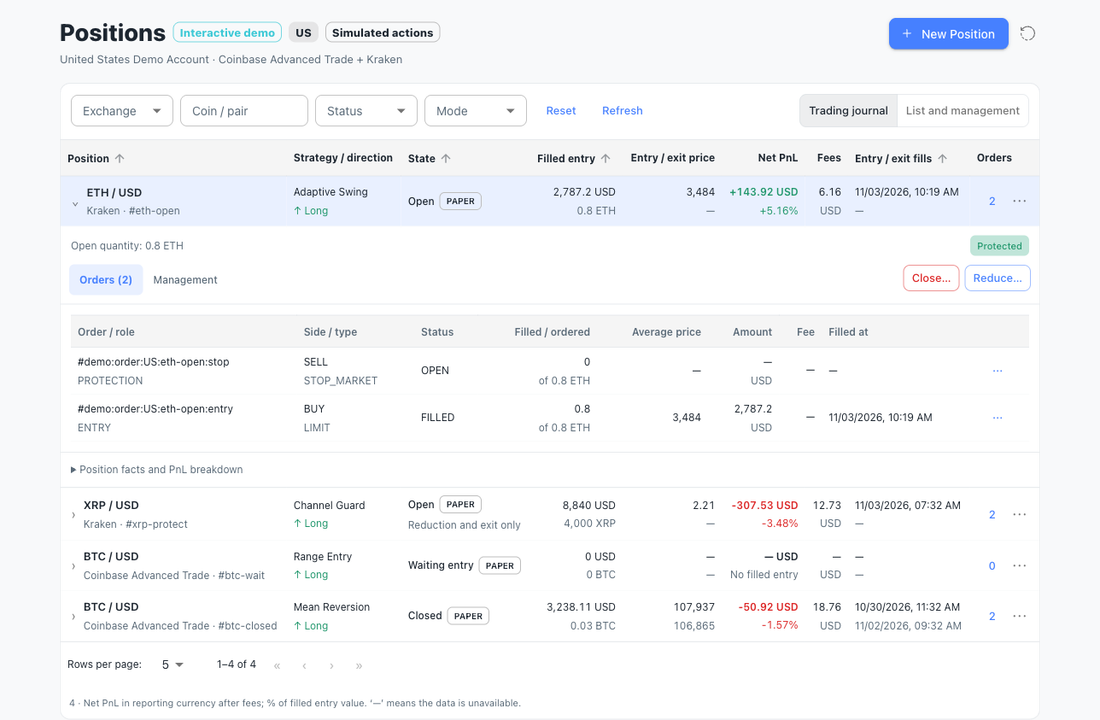
The sample journal identifies Adaptive Swing, Channel Guard and other strategies alongside each position and its state.
The ETH example has a filled 0.8 ETH entry at 3,484 USD and an open protective order. An open order is not a completed action.
Orders, fills and 6.16 USD in sample fees remain available for review. Missing history stays visible instead of becoming a confident result.
Revisit the plan and market context, inspect the actions taken and evaluate the result after costs. Use that review to adjust the next plan and develop a more repeatable way of trading.
Trader Profile adds a view of your habits: how you enter, hold and exit. It is one part of the wider position workflow, with the underlying records available to investigate.
See a sample Trader Profile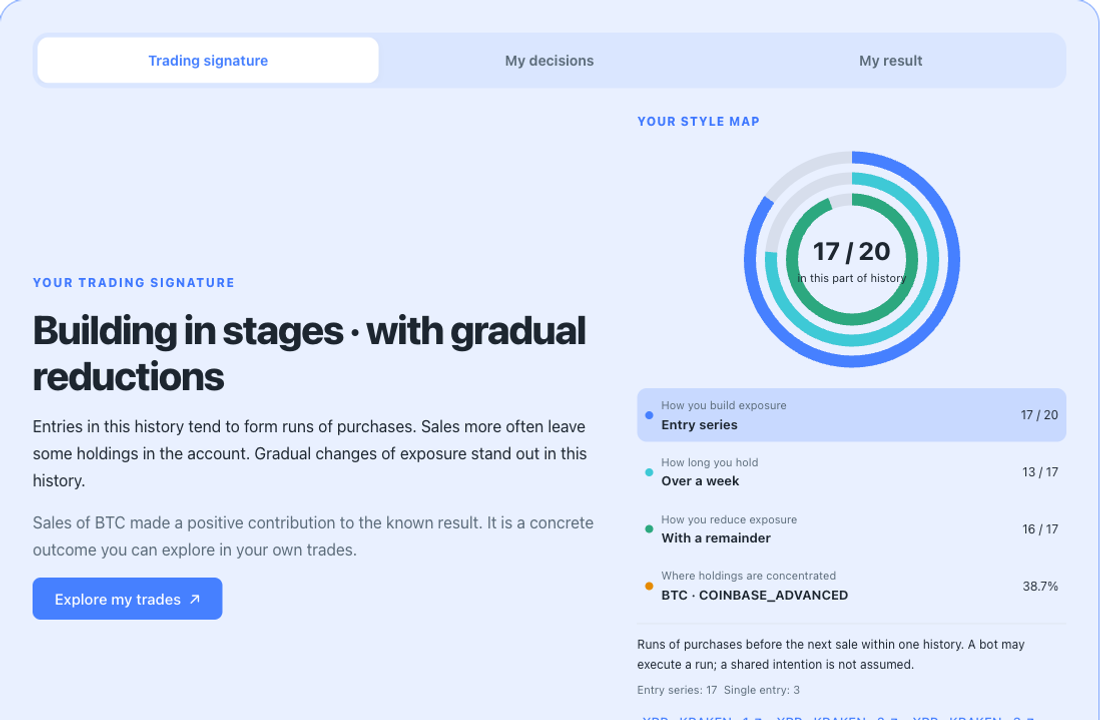
Compare the paid plans for real positions. If you want a first personal impression before buying, explore the intended Free beta scope.
Real positions, up to three connections and a broader history for regular review.
View Trader pricingConnect up to five accounts and review results across accounts, periods and trading methods.
View Pro pricingTry one exchange connection, a personal trading portrait and limited paper practice, free until beta testing ends.
Explore the optional betaYour trading keys stay encrypted on your device. Your terminal signs and sends permitted requests directly to the exchange, including automatic actions within your approved plan.
History, plans and analytics can use shared cloud services. Local monitoring requires the terminal to stay running and connected. If it stops, the server does not take over; accepted exchange orders may remain active.
Read the security modelExplore the position workflow, review the available plans and choose how to start.